Automatic IP blocking for WordPress

Persistent attacks?
Block them by IP.

Go beyond detecting attacks.

Automatic IP blocking records suspicious behavior for each source IP over one hour. When the total reaches 10 points (the default threshold), it automatically blocks that IP.

Suspicious file searches, login failures, repeated form submissions. Even if the methods are different, if they are the same IP, they add up. Connection sources that meet the conditions will be rejected for 14 days.

  • Cumulative scoring
  • Block for 1–365 days
  • See reasons and expiry
  • ¥500 one-time purchase

No monthly fees Use on sites you own

NagiShield — WordPress dashboard
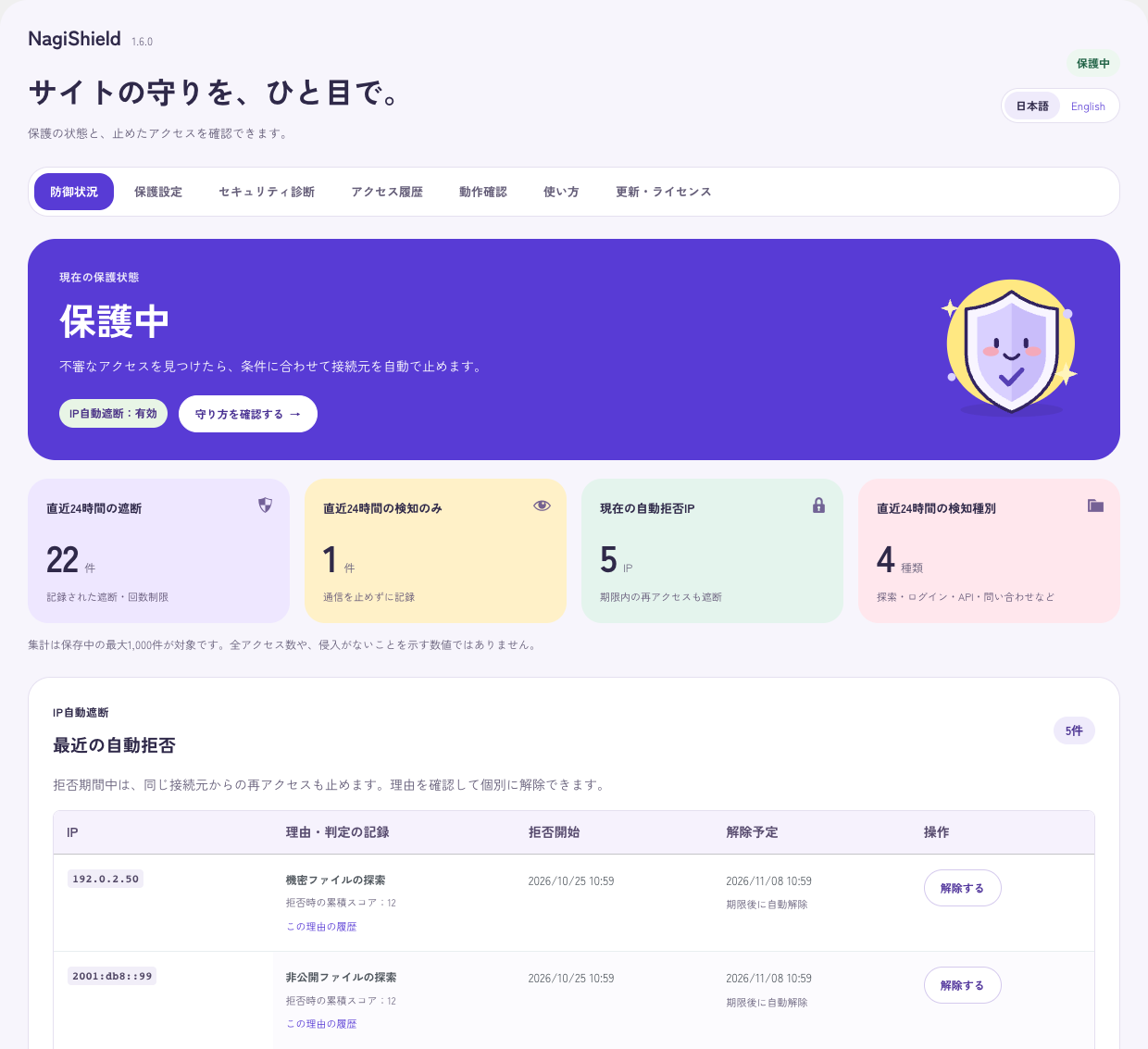
The actual management screen of NagiShield. You can check the protection status, number of blocked cases, automatically rejected IPs, and recent history.
Actual dashboard. Counts shown are from verification tests.
WordPress 6.5+ supportedPHP 7.4+ available inJapanese / English management screenNo external API Basic defense with

Automatic IP blocking with cumulative scores

Look beyond a single request.
Add up repeated suspicious behavior.

Suspicious behavior is recorded on an IP basis and automatically blocked when the cumulative total for one hour reaches a threshold.
Below is a mock example of standard settings (threshold 10 points, rejection 14 days).

IP automatic blocking process

Standard settings/simulation data
  1. 1st time+3 pointsCumulative total of 3 points
    /wp-content/plugins/adminer.php

    Suspicious PHP file probing

    A request probes the unpublished adminer.php file. Add 3 points to that IP.

    1st time. Well, maybe it's a coincidence.

  2. 2nd time+3 pointsTotal of 6 points
    /wp-admin/js/wp-update.php

    Explore another PHP file

    Even if the technique changes, the connection source is the same. The total is 6 points.

    Different tactics. Still the same IP.

  3. 3rd time+3 pointsTotal of 9 points
    /wp-content/plugins/wp_filemanager.php

    Explore more PHP files

    Total of 9 points. One more point until the threshold.

    Time to leave, perhaps?

  4. 4th time+3 pointsTotal of 12 points
    /wp-content/plugins/xwx1.php

    Threshold exceeded → automatic shutoff

    Exceeds the standard threshold of 10 points and begins a 14-day denial. The reason and deadline remain on the admin screen.

    If I come again, I'll add more.

You were asked to leave. Now you're blocked.

The denial period is based on the attack source IP. This is not the license expiration date.

The block expires. Monitoring continues.

The standard 14 days (set from 1 to 365 days) is the period during which attacking source IPs are denied. It will be automatically canceled at the end of the period, and future access will not be unconditionally denied. However, detection continues, and if the cumulative total reaches the threshold again, it will be automatically rejected again.

  • BlockedDeny access for same IP. The reason, total score, and cancellation schedule will remain on the management screen.
  • After the deadlineAutomatically released. Monitoring will continue, and if the conditions are met, the request will be automatically rejected again.
  • Refuse all the timeIf necessary, you can manually add it to the "Always Reject Connection Sources" list.
See specific example of judgment IP/Score/Access log

Example IP 192.0.2.45 But if you explore the following suspicious PHP files 4 times within an hour. Add up the 3 points for each, and when the fourth cumulative total of 12 points exceeds the standard threshold of 10 points, it will be automatically rejected.

  1. /wp-content/plugins/adminer.phpCumulative total of 3 points
  2. /wp-admin/js/wp-update.phpTotal of 6 points
  3. /wp-content/plugins/wp_filemanager.phpTotal of 9 points
  4. /wp-content/plugins/xwx1.phpTotal of 12 points/Automatic shutoff
  5. Same IP access againcontinue to refuse

This is a mock example of standard settings. It's not an actual attack. The points allocated vary depending on the rule (3 points, 2 points, 4 points, etc.), the threshold can be changed from 5 to 50 points, and the rejection period can be changed from 1 to 365 days. Not all attacks will be blocked in 4 tries. Corresponding known patterns may also result in immediate rejection.

Protect each entry point.

Malicious SQL.
Suspicious probing. Blocked.

IP auto-blocking is the final piece of advice. Before that, look at the SQL/suspicious search/login form at the entrance. The mechanism for stopping the game and the mechanism for accumulating points are considered separately.

  • 01
    SQL injection detection

    Checks search/sort syntax and rejects on the spot. It will not be added to your IP score.

  • 02
    Suspicious probing detection

    Detects private files and suspicious PHP names and adds 3 points for each detection.

  • 03
    Login/Continuous access

    Limit the number of failures and intensive access. Add 4 points when reaching the upper limit.

  • 04
    Form consecutive posting limit

    Limit the sending of Contact Form 7 by minutes or hours.

Automatic IP blocking

Same IP.
Different tactics. One score.

Suspicious searches, suspicious PHP, login failures, repeated form submissions. Separate detections are combined into an hourly score for the same connection source and automatically rejected with a standard score of 10.

SQL injection detection

Trying to slip into the database?
We recognize that pattern.

Inspect highly reliable SQL syntax hidden in search, sort, and pagination input. It doesn't just rely on words, but also on the usage and syntax of the input.

SQL detection is rejected on the spot. It is not added to the IP score and is separated from long-term IP denials.

Suspicious probing detection

Probing a file
that was never public?

Detects searches for PHP names commonly used in configuration files, backups, and attacks. Add 3 points for each time.

Repeated form submission limits

Questions are welcome.
Repeated spam is not.

Restrict transmissions from the same IP by minute or hour. You can also use hidden field and external URL inspection only when necessary.

Logs and operations

Block it. Then see why.

History/CSV outputFilter by result/reason/date/time/IP/pass and save.
Trusted IP/Constant RejectionAdministrators can specify connection sources for exceptions and connection sources to always deny.
Detection only modeRecord without stopping and check normal operation.
Presets by siteSelect Standard, Shop, or Strict.
Emergency cancellationRecovery procedures in case of configuration errors.
Automatic updates for purchasersCompatible with the standard WordPress update function by registering the key and verifying the identity of the purchase email.
View all features 34 protection/operation functions

Functions in detail.

List of installed functions

You can check the details by opening each item. Also includes features enabled in settings.

Thank you for your hard work searching for suspicious files.

Blocking unauthorized search and attack patterns

SQL injection countermeasures
Reject reliable attack syntax in target input. Additional monitoring such as body text can also be configured.
Path Traversal measures
Reject patterns that trace back to the parent folder and attempt to access unexpected locations.
Measures to search for private files
Inspects requests for files that are not intended to be made public, such as settings and backups.
Measures to search for suspicious PHP files
Searches for suspicious file names used in attacks are rejected and reflected in the risk level of the connection source.
Countermeasures against known management screen attacks
Inspect the attack pattern for the corresponding management Ajax. Immediately rejects the connection source according to the settings.
Rejection of communications claiming to be attack tools
Inspects the identification patterns of supported attack tools contained in the User-Agent.
How many times did you access it?

IP automatic blocking/login/continuous access restriction

Risk addition and IP automatic rejection
Aggregating the suspicious behavior of the target by IP. You can set thresholds, rejection days, and storage limits.
Limit number of login failures
Temporary locking occurs when multiple failures from the same connection source occur. You can adjust the number of times and lock time.
Mass access restrictions to protected targets
Restrict short-term, intensive access to protected items such as logins and APIs.
Administrative Ajax frequency limit
You can enable it when necessary and register actions required for normal operation to the exception.
Centralized access restrictions for the entire site
In preparation for centralized transmission that changes the connection source, you can also set an overall limit for logins and inquiries.
Even public APIs have boundaries to protect.

REST API/user information/browser protection

Username search measures
Restricts enumeration of unauthenticated user information using poster numbers or REST API.
Restrict unauthenticated REST bulk operations
Reject unauthenticated requests to REST API bulk processing endpoints.
Restrict bulk acquisition of post list
If necessary, you can restrict retrieval of a list of posts from the public REST API.
XML-RPC control
Authentication and pingback via XML-RPC can be restricted according to site operations.
security header
Add a header to prevent misjudgment of file type and frame embedding from other sites. Also specify the sending range of referrer information.
Consultations are welcome. Mechanical continuous pitching is not allowed.

Contact Form 7・Protection of corresponding contact form

Limits on the number of transmissions per minute/hour
Restrict consecutive postings from the same IP. You can also specify forms to be excluded from protection.
Inspect special hidden items
The input to the corresponding honeypot item can be used to determine automatic sending.
External URL restrictions
You can distinguish between your own site's URLs and external URLs, and select restrictions on inquiries that include external URLs.
Restrictions on English-only inquiries
This setting limits long inquiries that do not include Japanese. If you need to accept requests from overseas, you can turn it off.
Keep proper records of your work.

Adjust history, display, and settings to suit your operation.

defense dashboard
You can check protection status, number of cases in the last 24 hours, blocked IPs, and recent events.
History filtering and CSV output
You can search for history based on result, reason, date/time, IP, and path, and save it as CSV.
Retention period and IP mask display
You can choose the retention period for the history and settings to hide part of the IP when displayed. The body text and query values are not saved to the history.
Japanese/English management screen
You can choose the display language of the management screen from automatic, Japanese, or English.
Presets by site
Standard, shop-oriented, and strict settings are available. You can check the changes before applying them and revert to the previous settings.
Settings/IP determination confirmation guide
You can check the current protection settings and connection source IP determination, and follow the steps for normal operation and recovery.
Select data retention upon deletion
When deleting a plug-in, you can choose whether to keep or delete the settings and history.
Be tough on attackers. Be kind to administrators.

Exceptions/Recovery/Updates for purchasers

Detection-only monitoring mode
You can record requests without stopping, verify normal operation, and then switch to protection.
Individual cancellation/Trusted IP/Forcibly rejected IP
You can remove rejected IPs, specify trusted connection sources, and specify connection sources that are always rejected.
Proxy/CDN and IPv4/IPv6
You can register trusted proxies and choose a method to obtain the connection source IP that suits your environment.
Ajax form exception settings
You can adjust the processes required for EC and external collaboration, as well as forms to be excluded from protection.
Emergency cancellation
In case of a configuration error, we have prepared a procedure for emergency cancellation of protection and recovery.
License verification and official updates
Verify your identity using the purchase key and email address at the time of purchase, and register for each site. Supports update notifications, one-click updates, and WordPress standard automatic update ON/OFF. The defense works even if it is not registered.
Verification of update file signature/integrity
Check signatures, hashes, ZIP structure, and WordPress/PHP requirements before updating.

Management screen (rejection list/history)

See what was blocked.
Understand why.

Don't end with "I blocked something." I will explain exactly why I stopped it. You can check the rejected IP, reason, cumulative score, and cancellation schedule on the usual WordPress management screen.

NagiShield — Management screen
Actual NagiShield management screen. Displays protection status, number of blocks, automatic rejection IP, rejection reason and cancellation schedule.
Actual management screen taken during operation check. The number of published items does not reflect the results of actual operation.
  • Are you able to protect it now?Protection status and number of blocked/detected cases in the last 24 hours.
  • Who did you stop and why?Automatic rejection IP, reason, cumulative score and cancellation schedule.
  • If necessary, cancel it.Check the history and individually release IPs that were blocked by mistake.

Be tough on attackers. Be kind to administrators.

Start with detection.
Roll back if needed.

Start with detection only and adjust with site-specific presets. We also provide a function to return to the previous settings, individual IP cancellation, and emergency cancellation.

It's immoral to suddenly be banned. First, record it, make sure that regular orders and inquiries go through, and then protect it. Settings can be returned to the previous setting.

Welcart・WooCommerce

I'd be in trouble if I had to pay for my cart at the door.

Add products to cart, confirm order, move to payment. We introduce it while checking the flow that customers usually use. We provide presets for EC and settings to exclude known management Ajax such as Welcart.

Contact Form 7

Consultations are welcome. Consecutive submissions are not allowed.

Limit mass transmission from the same IP by minute or hour. You can restrict inquiries that include English or URLs only if necessary.

Custom forms are subject to the corresponding submission process. Not all forms are automatically protected.

  1. 01

    First, “detection only”

    Records suspicious access without stopping communication.

  2. 02

    Check usual operations

    Try logging in and updating the article, and check the history and IP determination.

  3. 03

    If there are no problems, enable protection.

    We also check the IP judgment of the proxy and operate automatic rejection.

Differences between Wordfence Free and Premium

IP blocking,
with a different approach.

Wordfence Free also has automatic blocking. However, the counting method is different. NagiShield aggregates "different types of suspicious activity" into an hourly score for the same IP.

Wordfence Free

Temporary lock with upper limit for each item.

Number of login failures, number of requests per minute, number of 404s. Set an upper limit for each item, and if it exceeds it, it will be temporarily restricted or blocked.

Strengths: WAF, malware inspection, and 2FA are free. Rules and signatures updated with a 30 day delay.

NagiShield

Add up different types of actions using the same IP.

3 points for suspicious PHP search, 3 points for path tracing, 3 points for suspicious UA, 2 points for user name enumeration, and 4 points for reaching the upper limit for login failure. The separate detections are added to the hourly score, giving a score of 10 and 14 days of rejection.

Strength: Check the reason for judgment, total score, and cancellation schedule on the Japanese management screen.

Wordfence Premium

$149 per year. Real-time shared IP blocklist.

Over 40,000 known attack sources are blocked from across the Wordfence network in real time. Rules and signatures are also delivered instantly.

$149USD / year

Official price as of October 2026NagiShield is available for purchase for ¥500.

Wordfence Premium's shared IP blocklist and NagiShield's cumulative judgment are not the same functionality. NagiShield does not have a shared list and only evaluates actions within the site. It is not a replacement for Premium. If you want to use WAF, malware inspection, and 2FA for free, Wordfence Free is a strong choice.

Feature comparison: NagiShield / Wordfence Free / SiteGuard WP Plugin / AIOS free version
FeatureNagiShieldLaunch 500 yen/one-time purchaseWordfence FreeFree versionSiteGuard WP PluginFreeAIOSFree version
Main protection rangeSQL injection/suspicious probing detection/login/form protectionWAF/Malware inspection/Login protectionFocusing on protecting management screens and loginsWAF, login protection, spam measures, etc.
Automatic block judgment methodCombine multiple types of detection for each IP for 1 hour. Automatic rejection with standard 10 pointsTemporary locking with upper limits for items such as number of failed logins and number of requests per minuteLock IPs that repeatedly fail to log inAutomatically locks due to login failure etc. You can also set IP restrictions for comment spam.
Post-block managementDisplays a list of reasons, start date and time, and cancellation schedule. Set individual cancellation/trusted IP/constant rejectionIP block list/release function availableSettings such as login lockManage locked IPs, rejection lists, audit logs, etc.
Continuous submission limit for Contact Form 7Limit transmissions from the same IP by minute/hourNo CF7-specific repeated submission limit stated in the reviewed documentationNot listed in the list of confirmed official functionsNo CF7-specific repeated submission limit stated in the reviewed documentation
Settings for EC sitesExclude known managed Ajax such as EC presets and WelcartAdjustment and operation confirmation required for each siteAdjustment and operation confirmation required for each siteAdjustment and operation confirmation required for each site
Malware inspectionNot equippedEquipped withNot listed in the list of confirmed official functionsNot included in the free version, available in Premium
two-factor authenticationNot equippedEquipped withNot listed in the list of confirmed official functionsIncluded in free version
price500 yen (tax included, one-time purchase)
Launch price
0 yen0 yen0 yen (free version)
Suitable usageAutomatically block suspicious IPs and review reasons and unblock them in a Japanese dashboard.I want to use WAF, scanning, and two-factor authentication all at once.I want to strengthen the entrance by changing the login URL, image authentication, etc.I want to use a wide range of WAF, login protection, and anti-spam measures.

As of October 26, 2026. We compare the current implementation of NagiShield with the official documentation for each product. "Not listed" does not mean that it is not compatible. This is a comparison of functions. The behavior varies depending on the settings of each product and the configuration of the site. Source:Wordfence Free、Wordfence price、rate limit、login protection、IP management、SiteGuard official feature list、AIOS free version、AIOS official feature list。

One-time purchase. No monthly fees.

Attacks may keep coming.
You only pay once.

Launch price

¥500

Tax included · one-time

Launch price until December 26, 2026 18:27One-time purchase. No monthly fees.

Regular price after 18:27 on December 26, 2026 1,500 yen (tax included, one-time purchase)

  • Get the ZIP and key after verifying the purchase email
  • Official updates for unlimited sites you own
  • Native WordPress update notifications and automatic updates
  • No fixed end date for official updates

Buy NagiShield

Can be used on sites owned by the purchaser. There is no set period for providing official updates. Release date: October 26, 2026. The launch price is valid until December 26, 2026 at 18:27 (Japan time). NagiShield itself is GPL-2.0-or-later, and key registration verifies the purchaser's access to official distribution and updates.

Contact us or request seller details

From purchase to protection.

Download your plugin.
Use it in WordPress.
Get started.

  1. 01

    Card payment with Stripe

    Check the price and offer conditions before purchasing. Enter your card information on the Stripe screen.

  2. 02

    Verify your identity via purchase email

    Open the purchase completion screen or the URL of the purchase email and enter the confirmation code sent to the email address used at the time of purchase. Get the ZIP and license key.

  3. 03

    Register your site and update it officially

    Install and activate ZIP on WordPress. Enter the key and email address at the time of purchase in NagiShield's "Update/License" and register this site with the confirmation code.

Can be used on sites owned by the purchaser. There is no set period for providing official updates. Release date: October 26, 2026. The launch price is valid until December 26, 2026 at 18:27 (Japan time).

Things to check before installing.

Frequently asked questions

Will this alone be enough to prevent all attacks?

It does not prevent all attacks. Use it in conjunction with WordPress and other plugin updates, backups, and WAF for servers and CDNs. Communication before WordPress starts and direct execution of files are not protected.

Can it be used even if the server has WAF?

It is intended for use in addition to server-side defense. NagiShield determines suspicious behavior on the WordPress side, automatically rejects it, and checks history. After installation, please confirm normal operation for each site.

Will it affect your inquiries or online shop?

Choose the protection that suits your site using e-commerce presets and exception settings. When installing, check the normal operation using only detection, and if there are no problems, enable protection.

What if I stop the IP by mistake?

Normally you don't need to do anything, as it will be automatically canceled when the set period ends. If you are sure that a false blocking has occurred, you can check the reason and history on the management screen and cancel it individually. Adjust trusted IPs and exceptions, and revert to detection only if necessary. In case you cannot access the management screen, we have also prepared an emergency cancellation procedure. In a shared IP or CDN environment, first check the determination of the connection source.

Does it stop when I write the word SQL?

It is not designed to block just that word. It distinguishes between searches and sorting and free descriptions such as the inquiry text, and makes judgments based on multiple characteristics. SQL detection rejects requests on the spot, but does not add points to your IP score and is separate from long-term IP rejections. Fundamental countermeasures require appropriate prepared statements on the application side.

Will I be attacked again after the denial period ends?

Once the denial period ends, the IP will be automatically canceled. The first access after cancellation will not be unconditionally denied, but detection will continue. If suspicious behavior accumulates again and reaches the threshold, it will be automatically rejected again. The 14th is not a license or renewal deadline, but a period to deny the attacking IP. If you wish, you can add the IP to the "Always Reject Connections" list.

Can it be used in conjunction with Wordfence?

Can be used together. However, if both parties stop the same communication, it will be difficult to trace the cause on the management screen. Please separate the roles of Wordfence into WAF, malware inspection, and 2FA, and NagiShield into cumulative judgment by IP and Japanese language rejection management. Wordfence Free's automatic blocking is determined based on upper limits for items such as the number of failed logins and the number of requests per minute. It is not a method that combines different types of detection like NagiShield.

How do I use automatic updates and licenses?

On the purchase completion screen or the URL of the purchase email, enter the confirmation code sent to the email address used at the time of purchase. Once you have obtained the ZIP and key, enter the key and the email address at the time of purchase in NagiShield's "Update/License" and register this site using the confirmation code you received. Once you are “registered”, you can use WordPress standard update notifications, one-click updates, and automatic updates. You can register multiple sites that you own using the same key and email address, and there is no upper limit on the number of sites. There is no set period for providing official updates. The key is used to receive official updates, and the current defense functions will work even if you are not registered.

Can I return or cancel the order?

Returns and cancellations for a change of mind are generally not accepted. Your statutory rights and remedies for a non-conforming product remain unaffected. See Terms of sale & usePlease check. Now accepting purchases.

Is the demo on this page an actual attack?

No. The IP automatic blocking demo on the page is simulated data that shows an example of how it works with standard settings. Being blocked after 4 attempts is an example of a case where each 3-point search continues 4 times in an hour; not all attacks will be blocked after 4 attempts. The image on the management screen is a record of what was actually detected and blocked in the test environment, and the IP is the document address. It does not indicate the number of attacks or defense rate in actual operation.